Learn More

Discover a comprehensive Solutions Center hub with resources, documentation, and expert guidance for all your business communication needs.

Access our dedicated customer service team around the clock, every day of the year. Get immediate assistance when you need it most.

Stay informed with real-time service updates, maintenance alerts, and important system notifications to keep your business running smoothly.

Monitor live system performance updates and network health metrics to ensure optimal communication service delivery across all platforms.

Technical support escalation for critical issues

Project implementation and deployment issues

Sales inquiries and contract negotiations

Billing disputes and account management

Strategic account growth and optimization

There is no better relationship in the industry than ones CallTower has with its partners. Here are just a few things that make working with us truly awesome.

Learn More

At CallTower, we consider our channel partners as family, valuing successful relationships through excellent support and financial rewards.

Learn More

Discover Are benefits of our Agency Partner Program for your business. Unlock revenue streams, scalable growth, and extensive support.

Learn More

CallTower's MSP Partner Program empowers service providers by simplifying taxation and enhancing efficiency through tools including the GTx self-service platform.

Learn More

Dynamic E-911

Empowering Emergency Calling: The Power of Dynamic e-911 for Teams Users’ Location Detection
Teams

Dynamic e-911 provides the ability to dynamically detect a Teams user’s location for emergency calling. Today, e-911 is available for users in admin configured locations on enterprise networks only.

With more and more Teams users working remotely, automatically obtaining the location in these scenarios is important to ensure timely emergency response.

Dynamic e-911

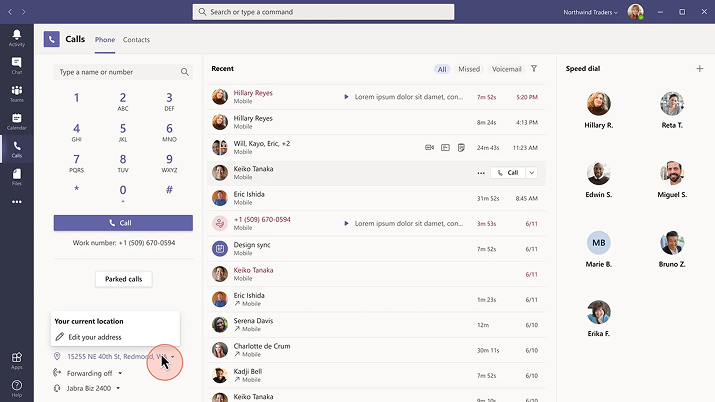
If users consent and their admin enables it, Teams e-911 can now dynamically lookup the location users from non-admin configured locations such as their home.

Dynamic emergency calling for non-admin defined locations will be off by default.
Admins must enable the External location Lookup Mode attribute in the Teams Emergency Calling policy, users must consent to location detection and users must be enterprise voice and emergency calling enabled.

Additional Information


Admin or auto-detected dynamic addresses on Calls App depending on users’ current location

The ability to edit and save non-admin defined dynamic addresses.

Users will not be able to edit admin defined location.

Users will be prompted to add emergency addresses if it is not autodetected.

Users can continue to manually add dynamic emergency addresses even if location auto-detection consent has been turned-off.

If you desire to utilise Teams e-911, it needs to be enabled for all targeted enterprise voice users by appropriately configuring the Teams Emergency Calling Policy and External Lookup Mode.

Users should also be instructed to consent to sharing their location to Teams as well as ensure their location is accurate by acknowledging and/or editing and then saving it.

The new feature is rolling out on Teams desktop, web and mobile. It will unfortunately only be available in USA.

E-911
E-911

Dynamic E-911